No-communications scheme
Ideal execution
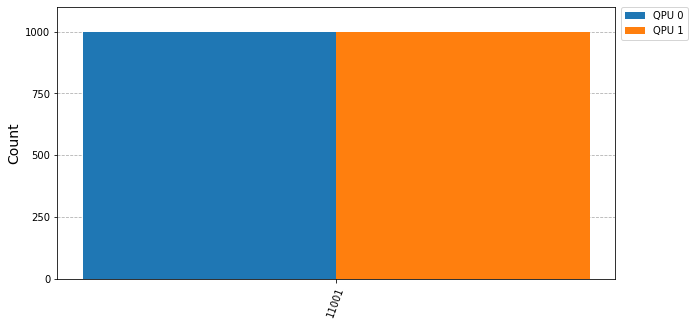
Let’s showcase here more advanced examples of the no-communication model that showcase a more complex use of CUNQA than the one displayed in the Embarrassingly Parallel section.
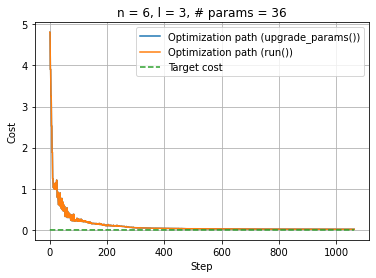
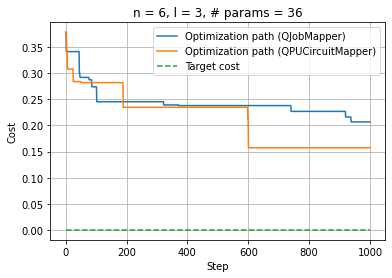
For optimization algorithms, the mappers submodule and the
upgrade_parameters method of the the QJob were
developed. The usage of these two features can be seen in the following examples.
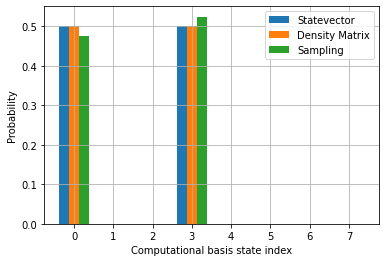
The following example shows how to obtain different statistics from QJob results:
Finally, we present an example of the local iterative QPE, so that the results obtained can be compared with the ones in Classical-communications scheme and Quantum-communications scheme.
import os, sys

# In order to import cunqa, we append to the search path the cunqa installation path
sys.path.append(os.getenv("HOME")) # HOME as install path is specific to CESGA

from cunqa.circuit import CunqaCircuit
from cunqa.qpu import qraise, get_QPUs, run, qdrop

import numpy as np

# 1. Circuit design
parametric_circuit = CunqaCircuit(3, 1)
parametric_circuit.h(0)
parametric_circuit.rx("x1", 1)
parametric_circuit.rx("x2", 2)
parametric_circuit.crz("theta", 0, 1)
parametric_circuit.crz("theta", 0, 2)
parametric_circuit.p("phase", 0)
parametric_circuit.h(0)
parametric_circuit.measure(0,0)


N_QPUS = 8                  # Determines the number of bits of the phase that will be computed
PHASE_TO_COMPUTE = 1/2**5
SHOTS = 1024
BIT_PRECISION = N_QPUS
SEED = 18                   # Set seed for reproducibility


# Parameters initial values
theta = 2 * np.pi * PHASE_TO_COMPUTE
x1 = np.pi
x2 = np.pi

try:
    # 1. Deploy vQPUs
    family = qraise(N_QPUS, "00:10:00", simulator = "Aer", co_located = True)
except Exception as error:
    raise error

try:
    qpus  = get_QPUs(co_located = True, family = family)


    measure = []
    for k in range(BIT_PRECISION):

        # 2. Circuit design
        power = 2**(BIT_PRECISION - 1 - k)

        phase = 0
        for i in range(k):
            if measure[i]:
                phase = phase + (1 / (2**(k-i)))
        phase = -np.pi * phase

        params = {
            "theta": power * theta,
            "phase": phase,
            "x1": x1,
            "x2": x2
        }

        # 3. Execution
        result = run(parametric_circuit, qpus[k % len(qpus)], params, shots = SHOTS, seed = SEED).result
        counts = result.counts

        zeros = sum([counts for result, counts in counts.items() if result.endswith('0')])
        ones = sum([counts for result, counts in counts.items() if result.endswith('1')])
        measure.append(0 if zeros > ones else 1)


    # 4. Post processing results
    estimation = 0
    for j,l in enumerate(measure):
        estimation = estimation + (l/(2**(BIT_PRECISION - j)))

    print(f"Estimated angle: {estimation}")
    print(f"Real angle: {PHASE_TO_COMPUTE}")


    # 5. Release resources
    qdrop(family)

except Exception as error:
    qdrop(family)
    raise error
Noisy execution
Running on noisy vQPUs requires two changes with respect to an ideal execution: the vQPUs must be deployed with a backend configuration describing the noise model to emulate, and the circuit must be transpiled to the vQPU’s backend before being run.
To deploy the noisy vQPUs, as it was explained in
Overview, the qraise Bash command or its
Python function counterpart qraise have to be employed with the --backend flag,
in the first case, and with the backend argument, in the second; both being the path to a
backend configuration JSON file. This backend file points, through its
noise_model.noise_properties_path field, to a noise properties JSON file. The format of both files
is shown in Backend JSON and
Noise properties JSON.
qraise -n 4 -t 01:00:00 --co-located --backend="complete/path/to/backend.json"
family = qraise(4, "01:00:00", co_located=True, backend="complete/path/to/backend.json")
Once the noisy vQPUs are deployed, the circuit has to be transpiled to the
vQPU’s backend with the transpiler function before
running it. This step is required so that the circuit is expressed in terms of the basis gates and the
connectivity supported by the noisy backend. The following example shows the complete workflow:
import os, sys
# In order to import cunqa, we append to the search path the cunqa installation path
sys.path.append(os.getenv("HOME")) # HOME as install path is specific to CESGA

from cunqa.qpu import get_QPUs, run, qraise, qdrop
from cunqa.circuit import CunqaCircuit
from cunqa.qiskit_deps.transpiler import transpiler

try:
    # 1. Deploy noisy vQPUs
    file_dir = os.path.dirname(os.path.abspath(__file__))
    backend_path = file_dir + "/noisy_backend.json"

    family = qraise(1, "00:10:00", simulator="Aer", co_located=True, backend=backend_path)
except Exception as error:
    raise error

try:
    [qpu]  = get_QPUs(co_located=True, family=family)

    # 2. Design circuit as any other execution
    qc = CunqaCircuit(num_qubits = 2)
    qc.h(0)
    qc.cx(0,1)
    qc.measure_all()

    # 3. Transpilation. Required for execution on noisy QPUs
    qc_transpiled = transpiler(qc, qpu.backend, opt_level = 2, initial_layout = None, seed = None)

    # 4. Execution
    qjob = run(qc_transpiled, qpu, shots = 1000)

    print(f"Counts: {qjob.result.counts}" ) # Format: {'00':546, '11':454}

    # 5. Relinquish resources
    qdrop(family)

except Exception as error:
    # 5. Relinquish resources even if an error is raised
    qdrop(family)
    raise error